Like I did in Part I of this series, I'll divide these up into stand alone devices and apps. This is by no means a comprehensive list of AAC apps and devices or their features. Many devices and apps have cool features including visual scenes (photos of rooms or places that can then have "hot spots" attached), but we didn't evaluate those features. I hope this will help others get started on their AAC journey.
Devices:
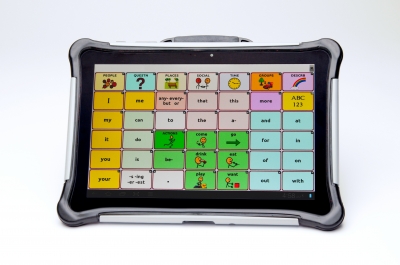
This is one of several devices based on the Unity language. "Unity focuses on frequently used words. Research has shown that approximately 400 frequently used words make up more than 75% of our speech, regardless of age, gender, or background." I liked the research that went into building this software. I also liked that the device uses motor patterns that can be learned in addition to icon recognition. We thought Moe would benefit from that.
There were a few downsides. First, it seems less intuitive to pick up - not for the learner (Moe), but for me and others that will be teaching Moe. It isn't based on the folder-like model I've seen with other devices and even icon based PECS.
At almost $5,000, it is also very expensive. But as I discussed last time, the devices are often covered by insurance and come with a high level of customer support from the company.

2. NOVA chat 5, 7, and 10 (Saltillo Corporation): This series of devices is based on customized Android hardware, with a variety of screen sizes (five, seven and ten inch screens). I was not able to see final hardware, as the sales rep only had a prototype device. The kick stand for keeping the device upright on the table was quite flimsy, but I do believe this was because it was only a prototype. Otherwise, the hardware was robust. They run from about $2,400-$3,900 and can be purchased here.
These devices use their Chat software, that includes "thousands of SymbolStix™ symbols, and PCS™ symbols can be added." There are several chat files that have different numbers of symbols, from as few as 4 up to, I believe, 80 on a single page. Moe was initially introduced to MultiChat 15, a 15-location vocabulary, designed for school-aged individuals with emerging language skills. Given frequent clinician modeling, cueing, and hand-under-hand prompting, Moe activated pictures on the dynamic display screen to compose short sentences, such as “I want” + “to drink” + “water”, “I want” + “to eat” + “ gummy”, and “I want” + “to eat” + snack” + “chips”.
Unlike the Unity system, these icons shrink as more are added to the page, removing the motor planning benefit (but making it easier to see when there are fewer icons). This is a nice device, but I thought Moe would benefit from the motor planning aspect of something like the Unity language.
Apps:
Note: Many, though not all, of these are available on Android, Kindle, or other devices. We reviewed these all on an iPad.
1. TouchChatHD communication software (Silver Kite): This was the first app we reviewed with the AAC specialist. It is a highly customizable app, which was nice but perhaps also what didn't work for me. It had too many features, and felt a bit overwhelming. One nice feature was that the button sensitivity can be adjusted. Because Moe tends to hit buttons multiple times, we made it so he had to press and hold the button for a short time to make it talk. This app also allows you to import photos, so we took pictures with the device and immediately imported them to the app. It was fairly easily customizable within the app itself.
This app is hierarchical in nature, where you press one button, say "eat," and then it navigates to another page with more choices, in this case specific foods. For our evaluation, we customized a 12 icon page, where each preferred item icon navigated to another page with two choices. You could add more choices, of course, "eat" leading to categories like "veggies," "fruits" and "snacks" with specific choices under there. Moe needed maximum modeling
and prompting to successfully use this app.
The app costs $150.

2. Proloquo2Go communication software (AssistiveWare): Many professionals and schools are familiar with this app, so I think it becomes a de facto choice for a lot of students. It has many similar features to the TouchChat, in terms of customization features and easy customizability within the app. It also allows free and predictive typing. It uses the same symbol set as the NovaChat devices. By the time we started talking about Proloquo2Go, I had already decided I wanted an app with a motor planning component, so we didn't evaluate this app.
The app costs $190.

3. TapToTalk: This was the first app I evaluated. I looked at this one on my own when a representative from the company contacted me. This is a relatively inexpensive app, with a free lite version and about $100 for a year or $180 lifetime. The app is available on many devices, including Android and Kindle Fire. I used an iPad.
This is a highly customizable app that comes with many photos built-in, but user photos can also be imported. I liked that you could name an icon anything, and it would convert it to speech. So if, for example, I called my car "Love Bug," the app would say that rather than just "car." I could make my picture be "mom" or "mommy" or "hey lady" or whatever. The SymbolStix library can also be added.
This is a hierarchical format as well, with pictures "jumping" to other pictures to eventual choices. So you could say "go," then "car" then "restaurant" then "McDonalds," or however you set it up. I'm not entirely sure this is how people actually think, though it is intuitive for those of us who already communicate, so it is a less steep learning curve for instructors.
There was one huge downside to this app, and that is that all the customization is done on a computer, then had to be synced to the app. Major pain, and completely impractical if you didn't have a WiFi connection at the time. This did however, allow you to create your albums and share them across many devices (at no extra charge).
Free trial version,$100/year or $180 lifetime.

4. LAMP Words For Life communication software (Center for Autism): LAMP
Words For Life is based on Prentke Romich Company’s (PRC) Unity language system and Language
Acquisition through Motor Planning (LAMP), a therapeutic approach that uses consistent motor planning for
access to vocabulary.
Like many of the apps, it can grow with Moe as his language skills advance. The app
includes three vocabularies to support language development: 1-Hit is an introductory level vocabulary;
Transition adds additional vocabulary; and Full Vocabulary includes over 3000 words and allows
customization.
The app features one motor planning per word that allows the development of quick
communication. Even as we add more words, the icons Moe has already learned will always be in the exact same place. Vocabulary Builder shows targeted words to limit distractions and increase success, and
Word Finder allows for locating a specific word.
The downside to this app is that it is purely symbol based, and doesn't use photos (at least in the beginning stages; I think pictures can be imported when we get to the customizable screens). Like the Unity app, it is based on the idea of Core and Fringe language. This can be more complicated for teachers (read: me) to learn, but I liked that the symbols are pre-defined based on research. Because we start only with core language, there is very little customization in the early stages of learning. To me, this means less tinkering and fewer ways for me to screw it up.
This is the app we ultimately chose, and I'll describe how we are using it in Part 3 of this series.
App is $300, though I got it for $150 on world autism awareness day!

6. Speak For Yourself: We took a brief look at SFY, an app that is also based on motor planning and the idea of core and fringe language. I liked the look and feel of the LAMP app a bit better, so ultimately chose that one, but this would have been a good alternative. I know several people who use this app with success, and they have great tips for general AAC learning on their Facebook page.
The app costs about $200.

Remember, there is no one best AAC app. If you think AAC is right for you or your child, request an AAC evaluation at school or find an SLP who has experience with many AAC apps. Try them out (codes are often available for 30 day trials of apps), look at the websites, and think about what features might be most beneficial to the user. You might decide to go with what your SLP has the most experience with, what the other kids at school use, or what most resembles the type of communication your child is already doing. Does he read? Does she use PECS? Does he understand icons or does he need photos?
I look forward to sharing more of our experiences with you along the way!